Kristina Schulz

Updated last month

iFunBox: Essential Utility for Windows Users

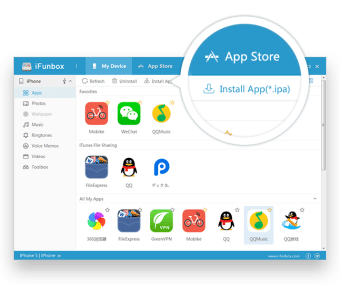
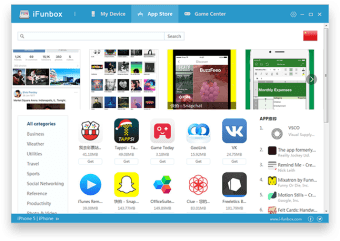
iFunBox is a free utility application designed for Windows that enhances the management of iOS devices. It provides users with a range of features including file transfer, app management, and device exploration, making it an essential tool for those who frequently work with iPhones and iPads. With its user-friendly interface, users can easily navigate through their device's files and folders, facilitating a seamless experience in managing content.

In addition to file management, iFunBox offers capabilities such as backing up and restoring apps, managing app data, and accessing the device’s file system. This program is particularly useful for users looking to organize their media files or troubleshoot issues with apps. Overall, iFunBox stands out as a versatile tool that simplifies the interaction between Windows PCs and iOS devices.


Kristina Schulz

    Kristina has professional experience in Europe, the United States, and Asia, specializing in communication and languages. She values adaptability in multicultural settings and brings this perspective to her writing. Her content reflects clarity, cross-cultural awareness, and practical expertise in connecting ideas through language.

     0/3

    App specs

    Program available in other languages


    User reviews about iFunBox

    2.7

    5 reviews

    Add review

    Main reviews for you

    • Anonymous user

      Not content anymore.. I used to like it very much and it worked great at first but now it doesnt install my tomtom upgrade, it stops at 57.5% and than gives an error after a while.

    • Anonymous user

      Its solved my problems its a great free app. its solved my problems its a great free app i waned to transfer my voice note to my computer and this software helped me doing so in no time Pros: easy to use (user experience)its free Cons: need to improve on interface

    • Anonymous user

      The MAC version is useless!. All I wanted was to transfer an app from my 3rd gen ipod touch, to my new iPad 3 (ios 5.1.1), using my Macbook (osx 10.6.8). But this software is totally pro-windows. The user interface is completely different for the MAC version, and it doesn't even have a "User Application" folder, like the Windows version. I'm sure there's another path, but I have no idea what it is, and their website isn't any help. All of their tutorials are for the Windows versions.  Pros: I have no idea. I couldn't get it to work. Cons: 1. No support for the MAC version. 2. No step by step guides = difficult to figure out.


    • Anonymous user

      Perfect for new users!. Being a new Apple Developer, I needed a fast program that would work fast and has a easy User Interface. iFunBox has all this and more! It is one of the better (if not the best) program to break down the iPod©/iPhone©/iPad©'s internal structure and look. The only downside to the program is the lack of explanation for the error codes. Overall, iFunBox is a really good program for up-and-coming Apple© developers. Pros: Good UI;Easy to use;Fast deployment to iPod©/iPhone©/iPad© Cons: Lack of error explanation

    • Anonymous user

      Spam!. Loads about a dozen advertizing apps that you need to dig out from the computer. Add to that, it is not free at all ... it is "limited function". Finally, the thing simply does not work. It complains that there is no iTunes installed ... however there IS. Junk. Save your time. Pros: Absolutely none. Cons: Spam.Does not work.Loads many spam apps.

    More

    You may also like

    Alternatives to iFunBox

    Explore Apps

    Latest articles

    Laws concerning the use of this software vary from country to country. We do not encourage or condone the use of this program if it is in violation of these laws.